)
Looking for something?
Questions? Warranty repairs? Product manuals? You can find all that and more right here.
FAQ
Troubleshooting
We've compiled some useful information here about the wireless unit. All of this can also be found in the product manual with illustrations.
Can the Wireless unit be installed to older TMK products?
Yes it can! The receiver box is screwed onto the frame of the product and the transmitter wired into the cabin. Once the solenoids are connected to the receiver and the transmitter has power from the cabin, you are good to go!
What should I do, if the connection is lost?
To reconnect the wireless unit, simply press both buttons of the transmitter to put it into register mode. Next press both buttons on the receiver and the pairing begins. Check the manual for more in-depth instructions!
Where should I start with troubleshooting?
First, check that both transmitter and receiver are getting power. Next check that the connection is working (pressing a button in the cabin activates a LED in the receiver). Next check that the solenoids are activating. This sequence should show where the problem is and can be further troubleshooted with the manual!
Can I reset the Wireless unit?
Yes! Resetting will de-pair the connection. The Receiver is reset by first pressing the S button and then pressing and holding the F button for 10 seconds. More instructions in the manual.
\n
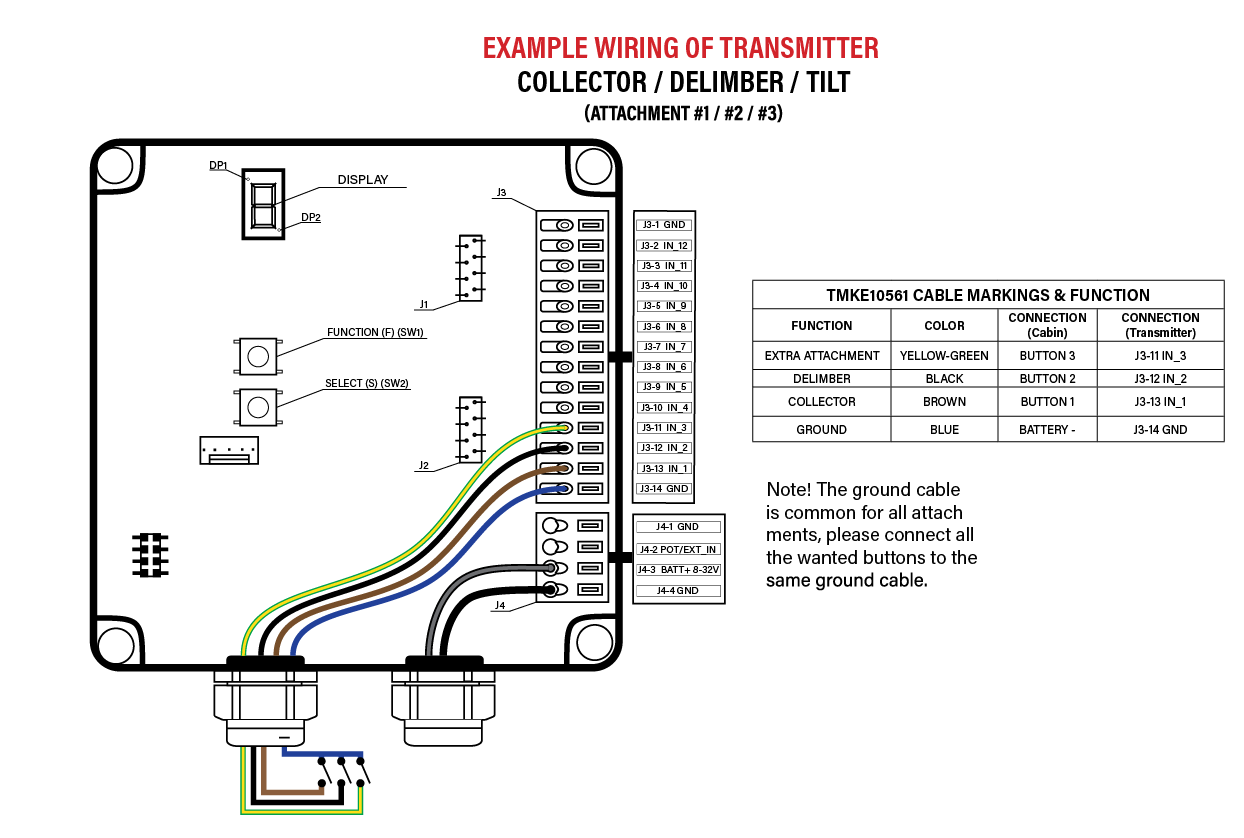
Connecting the Wireless transmitter to the excavator buttons
For long-term use, it is always best to connect the transmitter of the TMK Wireless unit straight to the buttons of the excavator (or other base machines).
Check out the diagram below to see how the cables should be connected. (Ask your TMK contact for more information if needed)
The TMK Turbo cylinder is a patented cutting cylinder solution for the TMK Tree Shears. It has 2 pistons, one smaller and one larger and a pressure valve, which determines when the larger cylinder starts moving.
The video below shows how the cylinder works in practice with the Collector attachment.
How to adjust, use & maintain your Turbo?
The TMK Turbo cylinder is a patented cutting cylinder solution for the TMK Tree Shears. It has 2 pistons, one smaller and one larger and a pressure valve, which determines when the larger cylinder starts moving.
This setup provides speed and power, but only when properly setup and maintained.
As every machine is different, to learn how to adjust the Turbo cylinder to your machine, watch the video below.
All TMK products require only very basic and minimal maintenance. By taking care of these few important things, your TMK product is sure to last you a long time in the future.
Keep the product clean of any branches, debris and other material. Make sure that the cylinder and other moving parts can move freely without obstructions.
Check the product daily for any possible damage
Grease the product regularly, atleast every 4-8 hours depending on amount of usage.
Inspect and tighten the bolts and connections as necessary. Make inspection with every greasing.
Sharpen the blades as necessary. Check section "Sharpening the blades" for more information.
For the Grapple Saw products, make sure to check the condition of the chain, saw bar and the lubrication system regularly and change when needed.
Check out the video below, to learn the proper cutting technique for efficient and correct usage of the Tree Shear!
By using the Tree Shear correctly, you will ensure a long product life and efficient operation of the product.
Sharpening the blade
When the Tree Shear’s blade dulls, sharpen it evenly on both the upper and lower sides with an angle grinder. This keeps the blade aligned and prevents the Tree Shear from twisting during work. A properly sharpened blade makes cutting easier and more efficient!
:quality(75)) For sharpening the blade, you need just an angle grinder, preferably a battery-powered one for ease-of-use.
For sharpening the blade, you need just an angle grinder, preferably a battery-powered one for ease-of-use.
:quality(75)) Sharpen the blade with fast, long, sweeping motions equally all along the blade. Do not keep the angle grinder in one spot, as this will heat the metal and ruin the blade.
Sharpen the blade with fast, long, sweeping motions equally all along the blade. Do not keep the angle grinder in one spot, as this will heat the metal and ruin the blade.
:quality(75)) Remember to sharpen it equally on both sides of the blade!
Remember to sharpen it equally on both sides of the blade!
:quality(75)) The Delimber blade should also be sharpened regularly.
The Delimber blade should also be sharpened regularly.
:quality(75)) If the Delimber seems to get stuck into the tree, countersharpening the grapple part of the Delimber can help.
If the Delimber seems to get stuck into the tree, countersharpening the grapple part of the Delimber can help.
Replacing the blade
In case the Tree Shear blade has been damaged badly or worn out from continued use and sharpening, it's a good idea to replace the blade to lengthen the product life of your Tree Shear.
First, start with ordering a replacement blade from your local dealer or TMK contact. We will send you a new blade as well as a cutting jig to help with changing the blade.
:quality(75)) By using the jig provided with the blade, proceed with cutting the old blade and welding the new blade by following these instructions:
By using the jig provided with the blade, proceed with cutting the old blade and welding the new blade by following these instructions:
Remove the Grapple
Cut out the old blade and reinforcement plates along the cutting line
Remove paint, oil and grease from the work area
Make welding chamfers to cutted edges
Select right filler wire e.G. Esab ok aristorod 12.50 1.0mm or 1.2mm
Preheat the work area to 100c°
Weld upper seam of the new blade
Clean the root of bottom seam
Weld bottom seam of the new blade
Paint unpainted surfaces
Reinstall the grapple
While welding Hardox always remember to:
Preheat the metal before welding
Take care not to overheat the metal. If it turns blue, it is damaged.
If your TMK product has any electrically controlled functions, you'll find its electric connections here.
:quality(75))
:quality(75))
Solid Loader Extension with 6/2 valve:quality(75))
Loader Extension with Tilt + 6/2 valve:quality(75))
Loader Extension with Tilt + two 6/2 valves:quality(75))
:quality(75))
With additional electric valve installed to the excavator boom
:quality(75))
Two electric valves
:quality(75))
No electric valves
External links
)
Extend you warranty
By registering a TMK product within 6 months of purchase, you can get 1 year of additional warranty!
)
Warranty conditions
Not sure what your warranty includes? Check out our full warranty clause here!
)
Product manuals
Instructions, spare parts & diagrams? Anything you might need to get the most out of your TMK product - right here.
)
Problem report
Ran into a problem with your TMK product? No worries! Just fill in the problem report and we'll get back to you about the solution.